Manual code reviews can slow down development and may overlook critical issues. That’s where Bitbucket AI code review tools come into play.
AI detects issues faster and offers objective, unbiased suggestions.
For Bitbucket repositories, leading options include Bito’s AI Code Review Agent, Qodo Merge, and CodeRabbit.
Bito, in particular, understands your entire repository to provide context-aware suggestions.
In this tutorial, I’ll guide you through setting up Bito’s AI Code Review Agent with Bitbucket for both automated and manually triggered reviews. Let’s dive in!
What is Bito’s AI Code Review Agent?
Bito’s AI Code Review Agent is a tool that uses advanced AI models to inspect code changes across your entire codebase—detecting bugs, code smells, security vulnerabilities, and performance bottlenecks—while seamlessly integrating with Bitbucket, GitHub, and GitLab to deliver quick, actionable feedback.
Key features:
- Context-aware recommendations: Deep understanding of your code including libraries, frameworks, functionality to improve code review.
- Pull request summary: Quick, comprehensive overviews of pull requests.
- AI code review: Assesses security, performance, scalability, optimization, impact on existing features, code structure, and coding standards.
- Tailored code suggestions: Precise, line-specific improvement suggestions.
- Incremental reviews: Analyzes only new changes with each commit, reducing review time and cost.
- Supports all popular programming languages: Works seamlessly with JavaScript, Python, Java, C#, PHP, and more.
- Integrated toolchain: Combines static code analysis, security vulnerability checks, secrets scanning (e.g., passwords, API keys, sensitive information), and linters for enhanced, actionable feedback.
- Privacy focused: Ensures complete confidentiality by never storing or using your code for model training.
How to install and use Bito’s AI Code Review Agent for Bitbucket
Follow these steps to set up the AI Code Review Agent for Bitbucket and run both automated and manual code reviews.
Step 1: Log in to Bito
Log in to Bito Cloud and select a workspace to get started.
Step 2: Open the Code Review Agents setup
Navigate to the Code Review Agents setup page via the sidebar.
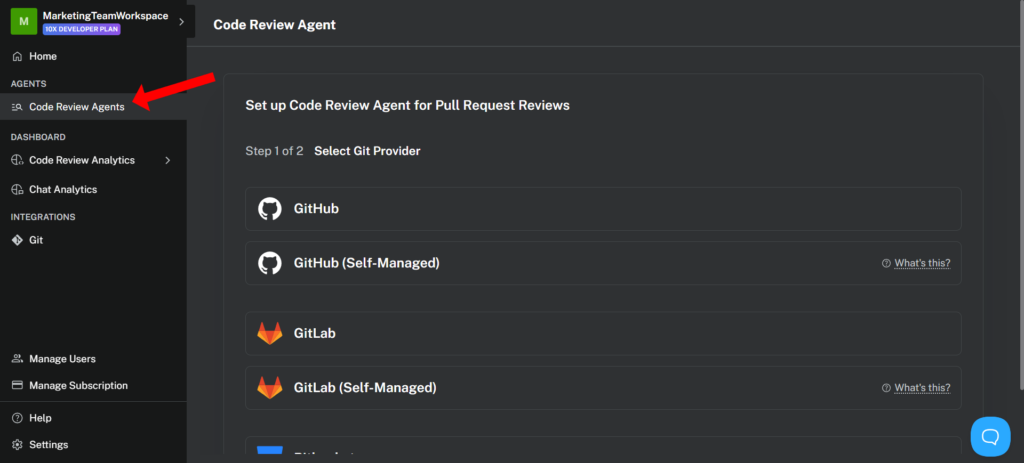
Step 3: Select Bitbucket as your Git provider
Choose “Bitbucket” from the list of supported Git providers.
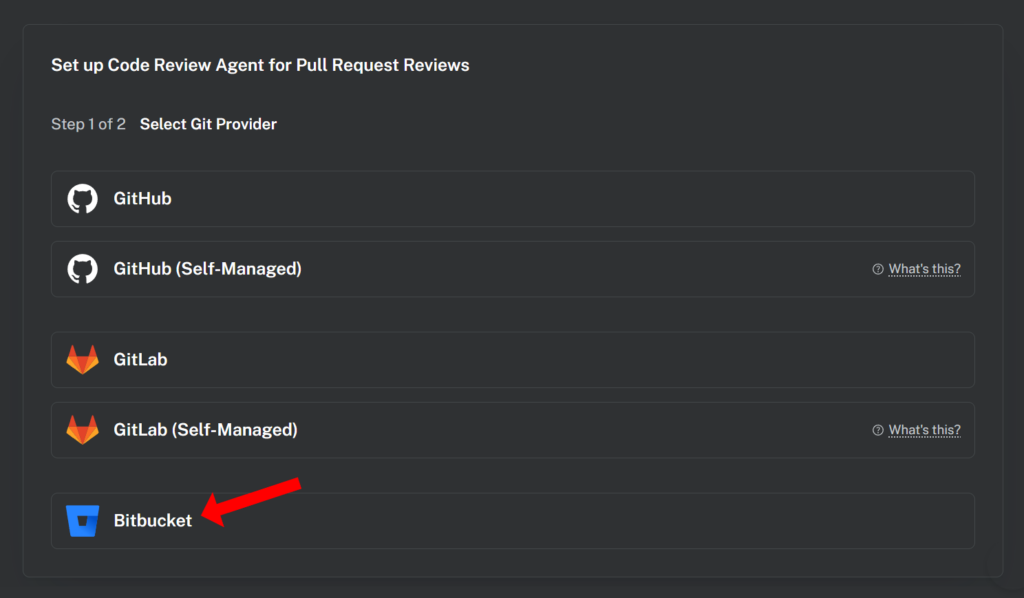
Step 4: Connect Bito to Bitbucket
To enable pull request reviews, you’ll need to connect your Bito workspace to your Bitbucket account.
Start by creating an App password. App passwords allow apps like Bito to access your Bitbucket account.
Ensure the required permissions are checked:
- Under Account, select Read.
- Under Pull requests, select Write.
- Under Webhooks, select Read and write.
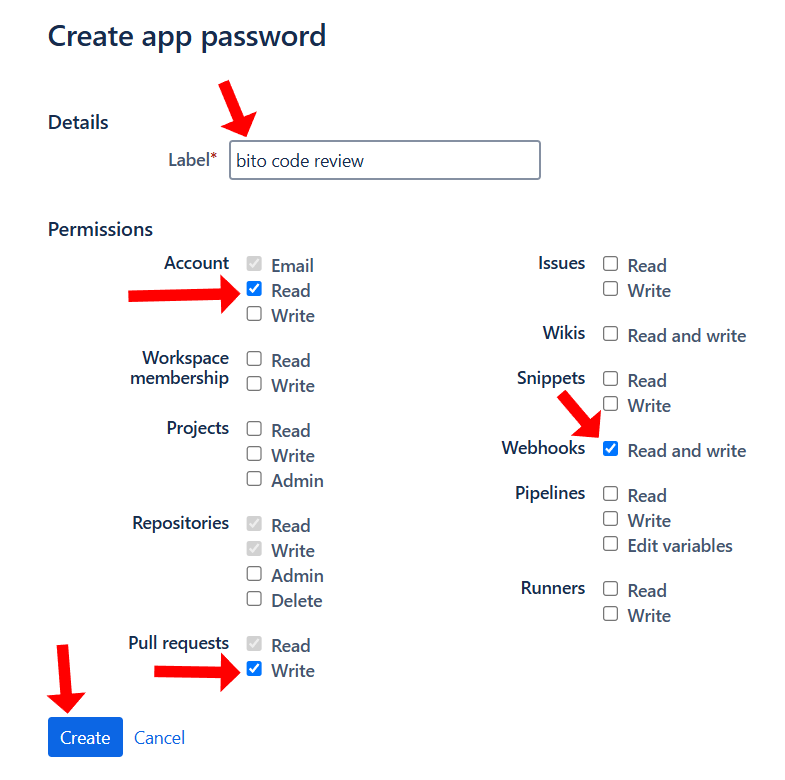
Once generated, enter your Bitbucket username and App password into the input fields in Bito.
Click Authorize to ensure the login credentials are working correctly.
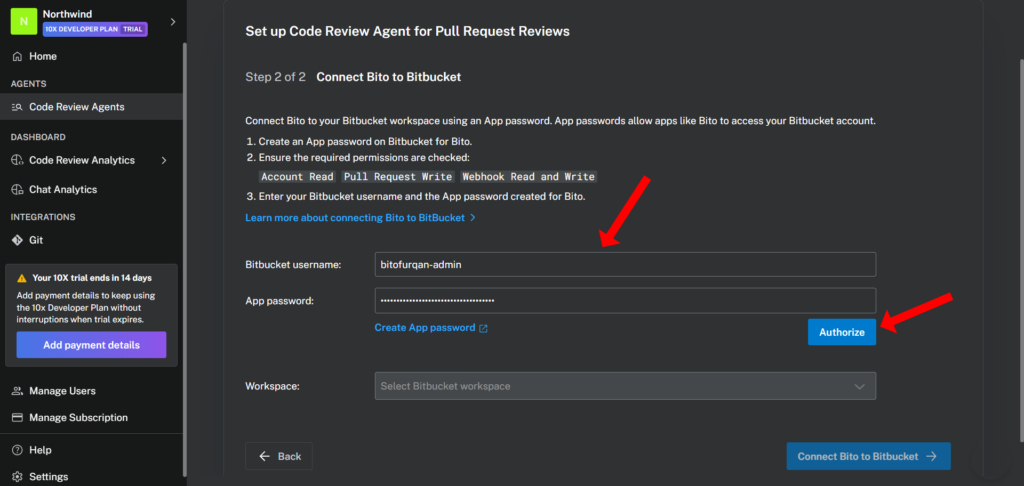
If the credentials are successfully authorized, you can select your Bitbucket workspace from the dropdown menu.
Click Connect Bito to Bitbucket to proceed.
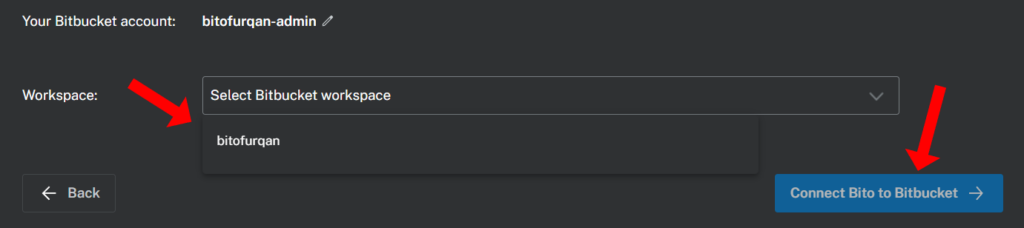
Step 5: Enable AI Code Review Agent on repositories
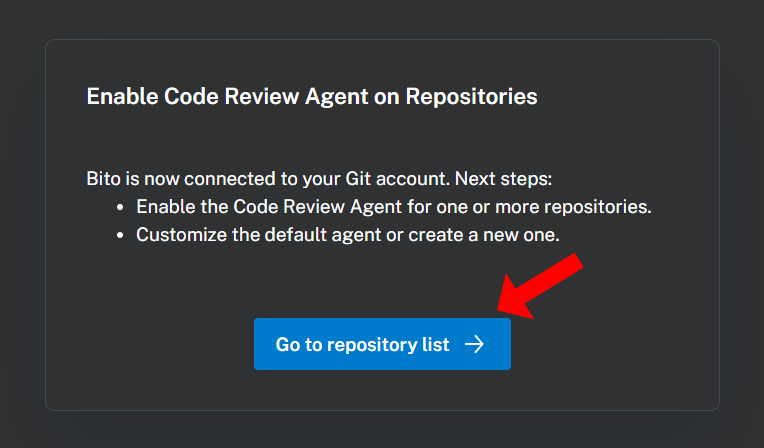
After connecting Bito to your Bitbucket account, you need to enable the AI Code Review Agent for your repositories.
Click the Go to repository list button to view all repositories Bito can access in your Bitbucket account.
Use the toggles in the Code Review Status column to enable or disable the Agent for each repository.
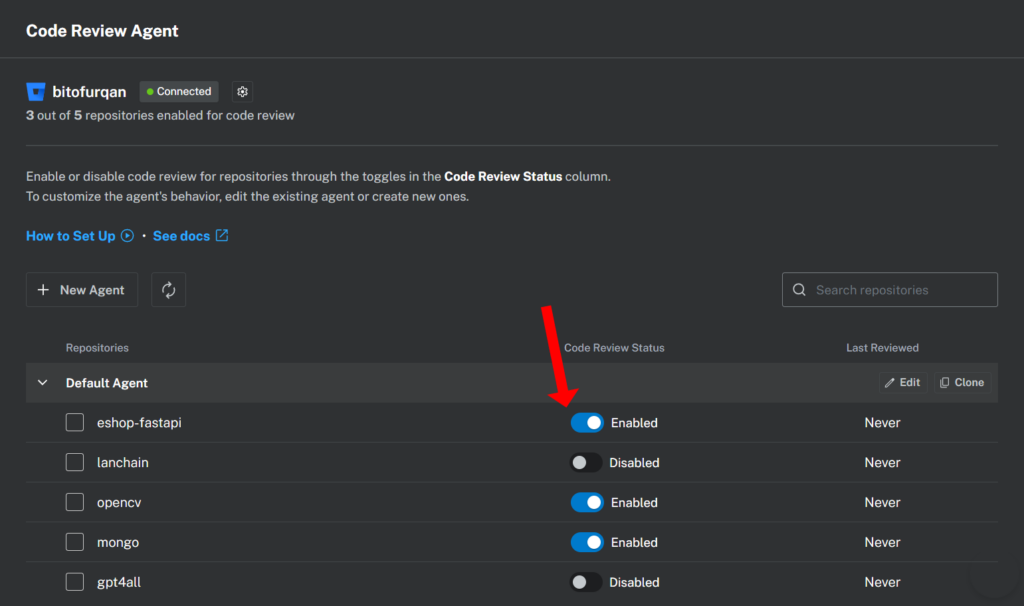
To customize the Agent’s behavior, you can edit existing configurations or create new Agents as needed. Learn more
Step 6: Automated and manual pull request reviews
Once a repository is enabled, you can invoke the AI Code Review Agent in the following ways:
- Automated code review: By default, the Agent automatically reviews all new pull requests and provides detailed feedback.
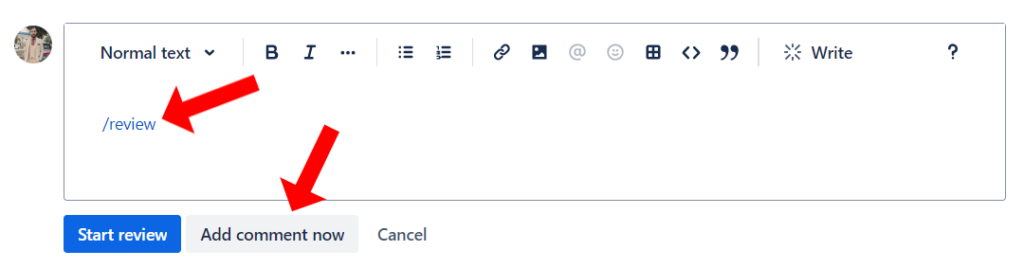
- Manually trigger code review: To initiate a manual review, simply type
/reviewin the comment box on the pull request and click Add comment now to submit it. This action will start the code review process.
Note: After typing /review, click anywhere inside the comment box to ensure that /review is not highlighted as a Bitbucket slash command so that the comment can be posted correctly.
The AI-generated code review feedback will be posted as comments directly within your pull request, making it seamless to view and address suggestions right where they matter most.
Note: To enhance efficiency, the AI Code Review Agent is disabled by default for pull requests involving the “main” or “master” branches. This prevents unnecessary processing and token usage, as changes to these branches are typically already reviewed in release or feature branches. To modify this default behavior and include the “main” or “master” branches, you can use the Source or Target branch filter.
Note: The AI Code Review Agent automatically reviews code changes up to 5000 lines when a pull request is created. For larger changes, you can use the /review command.
Step 7: Specialized commands for code reviews
Bito also offers specialized commands to provide detailed insights into specific areas of your code:
/review security: Analyzes code for security vulnerabilities./review performance: Evaluates code for performance issues./review scalability: Assesses the code’s ability to scale effectively./review codeorg: Scans for readability and maintainability./review codeoptimize: Identifies opportunities to enhance code efficiency.
By default, the /review command generates inline comments, meaning that code suggestions are inserted directly beneath the code diffs in each file. This approach provides a clearer view of the exact lines requiring improvement. However, if you prefer a code review in a single post rather than separate inline comments under the diffs, you can include the optional parameter: /review #inline_comment=False
For more details, refer to Available Commands.
Best Practices for Using Bito’s AI Code Review Agent
Here are some practical tips for making the most of Bito’s AI Code Review Agent:
1. Combine AI with Human Insight
While AI can quickly identify issues like security vulnerabilities and performance bottlenecks, human review is essential for:
- Grasping complex business logic and project-specific needs.
- Ensuring the code aligns with your team’s guidelines.
- Making nuanced decisions that go beyond automated analysis.
Encourage your team to review AI suggestions and add their insights when necessary.
2. Regularly Review AI Suggestions
Integrate the AI into your daily workflow to keep code quality high:
- Address issues flagged by the AI as soon as possible to avoid building up technical debt.
- Use the AI’s incremental reviews to maintain consistency over time.
- Periodically revisit past suggestions to spot recurring problems and improve overall coding practices.
3. Optimize Configuration Settings
Tailor Bito’s AI Code Review Agent to fit your project’s needs:
- Adjust settings such as auto-review triggers, incremental reviews, and batch time for processing code changes.
- Exclude specific files, folders, or Git branches from reviews to focus on relevant code changes.
4. Leverage specialized review commands
Bito provides specific review commands to enhance targeted feedback:
/review security: Focuses on detecting security vulnerabilities./review performance: Identifies areas to optimize performance./review scalability: Ensures the codebase can scale efficiently./review codeorg: Assesses readability and maintainability./review codeoptimize: Suggests improvements for code efficiency.
Encourage your team to use these commands strategically to refine the review process further.
5. Integrate AI Code Review into your CI/CD pipeline
For continuous code quality improvement, automate AI-powered code reviews within your CI/CD pipeline:
- Trigger Bito’s AI reviews for every pull request.
- Use AI feedback as a gating mechanism before merging changes.
- Ensure compliance with security and performance standards early in the development lifecycle.
How Bito’s AI Code Review Agent enhances collaboration in Bitbucket
Code reviews are a team effort, and Bito’s AI Code Review Agent enhances collaboration by:
- Providing clear, actionable feedback: AI-generated comments help reviewers focus on meaningful discussions.
- Reducing review fatigue: Automating repetitive checks ensures developers can concentrate on high-impact areas.
- Standardizing code review practices: AI-driven reviews create consistency across teams by applying uniform evaluation criteria.
- Fostering mentorship: Junior developers can learn from AI-generated insights, improving their coding skills over time.
FAQs: Bitbucket AI code review
How does AI-powered code review differ from traditional code reviews?
AI-powered code review automates repetitive checks, detects security vulnerabilities, and provides contextual suggestions, while traditional code reviews rely entirely on manual inspection by developers.
Can Bito’s AI Code Review Agent replace human reviewers?
No, AI enhances the review process but doesn’t replace human judgment. Developers should still review AI-generated suggestions for accuracy and project-specific considerations.
Is Bito’s AI Code Review Agent compatible with private repositories?
Yes, Bito works with both public and private repositories on Bitbucket, GitHub, and GitLab.
How does Bito’s AI Code Review Agent ensure security and privacy?
Bito never stores or uses your code for AI model training, ensuring complete privacy and security compliance.
What programming languages does Bito support for code review?
Bito supports all popular programming languages, including Python, JavaScript, Java, C++, and more.
How do I customize Bito’s AI Code Review Agent for my team’s workflow?
You can adjust auto-review triggers, enable/disable incremental reviews, set batch processing times, exclude specific files, folders or git branches, and integrate static code analysis or security vulnerability scanning tools.
Conclusion
Bitbucket AI code review tools can dramatically cut down on repetitive tasks, catch sneaky bugs, and help teams keep pace with fast development cycles. Tools like Bito’s AI Code Review Agent, CodeRabbit, and Qodo Merge bring intelligent suggestions directly into Bitbucket, making code reviews more efficient.
By integrating Bito’s AI Code Review Agent, you’ll gain a powerful AI-driven partner for your next pull request—one that ensures higher code quality and faster development cycles.


 by the Bito team.